
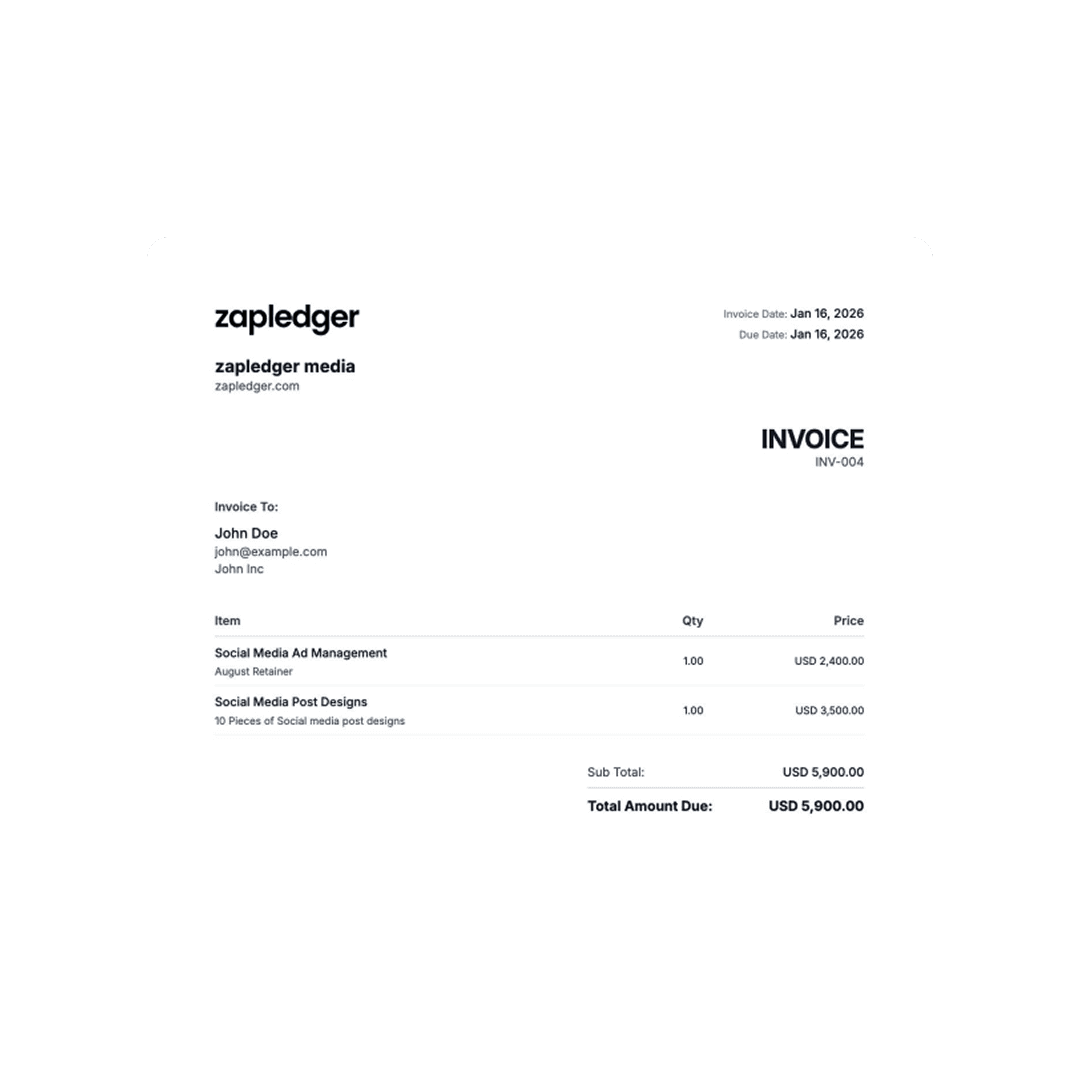
Starting your freelance career is exciting, but getting paid shouldn't be complicated. Whether you're a graphic designer, writer, consultant, or developer, knowing how to create professional invoices is essential for your business success. This comprehensive guide will walk you through everything you need to know about invoicing clients professionally.
What Makes an Invoice Professional?
A professional invoice does more than ask for payment. It represents your brand, establishes credibility, and makes it easy for clients to pay you quickly. Professional invoices include several key elements that amateur invoices often miss.
Essential Invoice Components
Your invoice must include your business information clearly displayed at the top. This includes your business name (or your full name if you operate as a sole proprietor), your business address, phone number, and email address. Many freelancers also include their business logo to reinforce their brand identity.
Client information comes next. Include the client's company name, contact person's name, and their billing address. This ensures the invoice reaches the right person and department, especially in larger organizations.
Every invoice needs a unique invoice number. This helps both you and your client track payments and reference specific invoices in future communications. A simple numbering system like "INV-001," "INV-002" works perfectly. Some freelancers prefer to include the year, such as "2026-001."
The invoice date tells clients when the invoice was issued. Equally important is the due date, which sets clear expectations for when payment is expected. Common payment terms include "Net 30" (payment due within 30 days), "Net 15," or "Due Upon Receipt."
How to Structure Your Services and Pricing
The heart of your invoice is the itemized list of services or products you're billing for. Vague descriptions like "Design work - $500" leave clients confused and can delay payment. Instead, be specific.
For a graphic designer, this might look like:
- Logo design concepts (3 variations) - $750
- Logo revision rounds (2 rounds) - $300
- Final logo files (AI, PNG, SVG formats) - $150
- Brand style guide - $400
For consultants:
- Strategy consultation (4 hours @ $150/hour) - $600
- Market analysis report - $800
- Implementation roadmap - $400
Clear itemization shows clients exactly what they're paying for and demonstrates the value you've provided. It also makes it easier to discuss the invoice if questions arise.
Include your hourly rate or project fee for each line item, the quantity or hours worked, and the total for that line. Then calculate subtotals before taxes.
If you need to charge sales tax, GST, or VAT, clearly show this as a separate line item with the appropriate percentage. Finally, display the total amount due prominently.
Payment Terms That Get You Paid Faster
Your payment terms directly impact how quickly you receive payment. Consider these strategies:
Early Payment Discounts: Offering a 2-5% discount for payment within 7-10 days can significantly speed up cash flow. Example: "2% discount if paid within 10 days, full amount due within 30 days."
Late Payment Fees: Clearly state that late payments will incur a fee. This might be a flat fee or a percentage per month. Example: "1.5% monthly interest on overdue balances."
Accepted Payment Methods: List all ways clients can pay you. The more options you offer, the easier you make it for clients to pay. Include bank transfer details, PayPal, credit card options, or digital payment platforms.
Partial Payment Options: For large projects, consider allowing milestone payments or deposits. This improves your cash flow and reduces risk.
Common Invoicing Mistakes to Avoid
Many freelancers unknowingly delay their own payments by making these common mistakes:
Mistake #1: Vague Descriptions
Don't write "Consulting services - $2,000." Instead, specify "Brand strategy consulting: 6 sessions @ 2 hours each, competitive analysis, brand positioning document."
Mistake #2: Missing Contact Information
If clients can't easily reach you to clarify questions, payment stalls. Include your email and phone number prominently.
Mistake #3: No Payment Instructions
Clients shouldn't have to guess how to pay you. Provide clear instructions: "Payment can be made via bank transfer to [account details] or PayPal to [email]."
Mistake #4: Forgetting to Follow Up
Don't assume clients will pay automatically. Send a friendly reminder 5 days before the due date, and follow up promptly if payment is late.
Mistake #5: Inconsistent Numbering
Jumping from Invoice #5 to Invoice #23 looks unprofessional and raises questions. Keep sequential numbering.
How Invoicing Software Simplifies the Process
While you can create invoices in Word or Excel, dedicated invoicing software saves time and reduces errors. Modern invoicing tools like Zapledger offer several advantages:
Automated Calculations: No more math errors. The software automatically calculates subtotals, taxes, and totals.
Professional Templates: Start with beautiful, professional templates that you can customize with your branding.
Payment Tracking: See which invoices are paid, pending, or overdue at a glance.
Automated Reminders: Set up automatic email reminders for upcoming and overdue payments.
Multi-Currency Support: If you work with international clients, invoicing software handles currency conversion automatically.
Financial Reports: Generate reports showing your income, outstanding payments, and revenue trends without manual spreadsheet work.
Step-by-Step: Creating Your First Invoice
Let's walk through creating an invoice using best practices:
Step 1: Open your invoicing software or template. Add your logo and business information at the top.
Step 2: Enter your client's information including company name, contact person, and billing address.
Step 3: Assign a unique invoice number following your numbering system.
Step 4: Enter today's date as the invoice date, then calculate and enter the due date based on your payment terms.
Step 5: List each service or product you're billing for with clear descriptions, quantities, rates, and line totals.
Step 6: Add a subtotal, then calculate and add any applicable taxes.
Step 7: Display the total amount due prominently.
Step 8: Include your payment terms, accepted payment methods, and payment instructions.
Step 9: Add a personalized note thanking the client for their business.
Step 10: Review everything carefully for accuracy, then save and send the invoice.
When and How to Send Invoices
Timing matters when it comes to invoicing. Send invoices immediately upon project completion, or according to milestone schedules agreed upon in your contract. The longer you wait, the longer you wait to get paid.
For ongoing retainer work, send invoices on the same day each month. This creates predictability for both you and your client.
Use professional email communication when sending invoices. Your subject line should be clear: "Invoice #2026-015 for [Project Name] - Due [Date]."
In the email body, briefly remind the client what the invoice is for, highlight the due date, and thank them for their business. Attach the invoice as a PDF to ensure formatting remains consistent regardless of how the client views it.
Following Up on Unpaid Invoices
Even with perfect invoices, you'll occasionally need to follow up on late payments. Here's a diplomatic approach:
5 Days Before Due Date: Send a friendly reminder that payment will be due soon.
On Due Date: Send a polite email confirming the invoice is due today and asking if they need any clarification.
5 Days After Due Date: Send a firmer follow-up noting that payment is now overdue and asking when you can expect it.
15 Days After Due Date: Send a final notice mentioning any late fees that may apply and requesting immediate payment.
Throughout this process, maintain professionalism. Most late payments result from administrative oversights rather than intentional non-payment.
Taking Your Invoicing to the Next Level
As your freelance business grows, consider these advanced invoicing practices:
Recurring Invoices: For retainer clients, set up automatic monthly invoices.
Proposal Integration: Convert accepted proposals directly into invoices without re-entering information.
Time Tracking Integration: Link time tracking tools to your invoices for automatic billable hours calculation.
Client Portal: Give clients a portal where they can view all invoices, payment history, and make payments online.
Financial Forecasting: Use invoice data to predict future revenue and identify your most profitable clients or services.
Professional invoicing isn't just about getting paid—it's about building a sustainable freelance business. By implementing these practices, you'll spend less time chasing payments and more time doing the work you love.